Brands that repurpose creator content across channels see 3x more engagement per dollar spent than those using assets once — yet 68% of marketing teams still treat every creator deliverable as a single-use asset. The result? Thousands of dollars in high-performing content sitting unused in shared drives, never reaching the audiences that would convert.
This guide is part of our Creator Content Strategy: Building a Scalable Creative Program for Your Brand — a comprehensive pillar resource covering every aspect of building, managing, and scaling creator content programs.
Content repurposing isn’t just about efficiency — it’s about compounding the ROI of every creator relationship you build. A single creator video can become a paid social ad, an email hero image, a product page testimonial, a blog embed, and a LinkedIn carousel — each version reaching a different audience at a different stage of the buying journey.
In this guide, you’ll learn:
- Why most brands waste 80%+ of their creator content value by using assets only once
- The 5-step framework for turning one creator deliverable into 10+ channel-ready assets
- Which content formats repurpose best across paid, owned, and earned channels
- How to structure creator contracts to include repurposing rights from day one
- Real measurement frameworks to track repurposed content performance vs. original
- How partnrUP’s platform automates asset management and tracking across repurposed content
Table of Contents
- Why Content Repurposing Is the Highest-ROI Move in Creator Marketing
- The 5-Step Content Repurposing Framework
- Which Creator Content Formats Repurpose Best
- Structuring Creator Contracts for Repurposing Rights
- Channel-by-Channel Repurposing Strategy
- Building a Scalable Asset Management System
- Measuring Repurposed Content Performance
- 7 Content Repurposing Mistakes That Kill Your ROI
- Frequently Asked Questions
Why Content Repurposing Is the Highest-ROI Move in Creator Marketing
The economics of creator content are straightforward: production is the expensive part, distribution is almost free. When you commission a creator to produce a 60-second product review video, you’re paying for their creative expertise, production quality, audience trust, and the time they invest in crafting something authentic. Using that asset once — on a single Instagram Story or TikTok post — captures a fraction of its potential value.
The Single-Use Content Problem
Most brands operate on a campaign-by-campaign basis. A creator delivers content, it gets posted on the creator’s channel, the brand maybe reshares it once, and the asset disappears into a folder. Meanwhile, the brand’s paid social team is creating net-new assets from scratch. The email team is commissioning separate photography. The product marketing team is writing testimonials that could have come directly from creator content.
This siloed approach means brands typically extract only 15-20% of the total value from each creator asset. The remaining 80% evaporates — not because the content isn’t good enough, but because no one mapped out where else it could go.
The Compounding Value of Repurposed Content
When you systematically repurpose creator content, you create a compounding asset library. Every new creator relationship adds assets that can serve multiple channels, campaigns, and customer touchpoints simultaneously. Over 12 months, a brand running 50 creator campaigns with a repurposing strategy might have 500+ channel-ready assets — versus 50 single-use posts without one.
The math gets even more compelling when you factor in performance data. Creator content consistently outperforms brand-produced creative in paid social: UGC-style ads see 29% higher conversion rates than traditional brand creative, according to multiple industry benchmarks. That means every repurposed creator asset isn’t just filling a content gap — it’s outperforming what you’d create in-house.
The 5-Step Content Repurposing Framework
Effective content repurposing isn’t random. It follows a systematic process that starts before the creator even picks up their camera. Here’s the framework that the most efficient content teams use:
Step 1: Audit Your Content Needs by Channel
Before commissioning creator content, map every channel where you need assets:
- Paid social — Facebook/Instagram ads, TikTok Spark Ads, Pinterest promoted pins
- Organic social — Brand account posts, Stories, Reels, carousels
- Email marketing — Hero images, product showcases, testimonial sections
- Product pages — UGC galleries, video reviews, social proof widgets
- Blog content — Embedded videos, pull quotes, creator spotlights
- Retail/wholesale — Sell sheets, retailer pitch decks, in-store displays
This audit reveals content gaps you can fill with repurposed creator assets instead of commissioning separate shoots for each channel.
Step 2: Brief Creators for Multi-Format Output
The repurposing strategy starts in the creative brief. Instead of asking for a single deliverable, structure your brief to capture maximum raw material:
- Request vertical AND horizontal versions of video content
- Ask for B-roll footage alongside the main deliverable — product close-ups, unboxing moments, reaction shots
- Include still photo captures from the same shoot session
- Request raw audio testimonials that can be transcribed for written content
- Ask creators to film a 30-second and 60-second version to cover different ad placement requirements
Step 3: Categorize and Tag Every Asset
Once content arrives, the asset management process determines how much value you’ll actually extract. Every piece of creator content should be tagged with:
- Content type — video, photo, testimonial, B-roll, raw footage
- Product/SKU — which specific products are featured
- Creator details — name, handle, audience demographics, niche
- Usage rights — organic only, paid media, whitelisting, duration
- Format specs — resolution, aspect ratio, duration, file size
- Performance data — engagement on original post, click-through rates, conversions
Teams using partnrUP’s platform automate much of this tagging process — assets are cataloged with creator data, campaign metadata, and performance metrics as they’re delivered, making retrieval and repurposing frictionless.
Step 4: Create a Repurposing Matrix
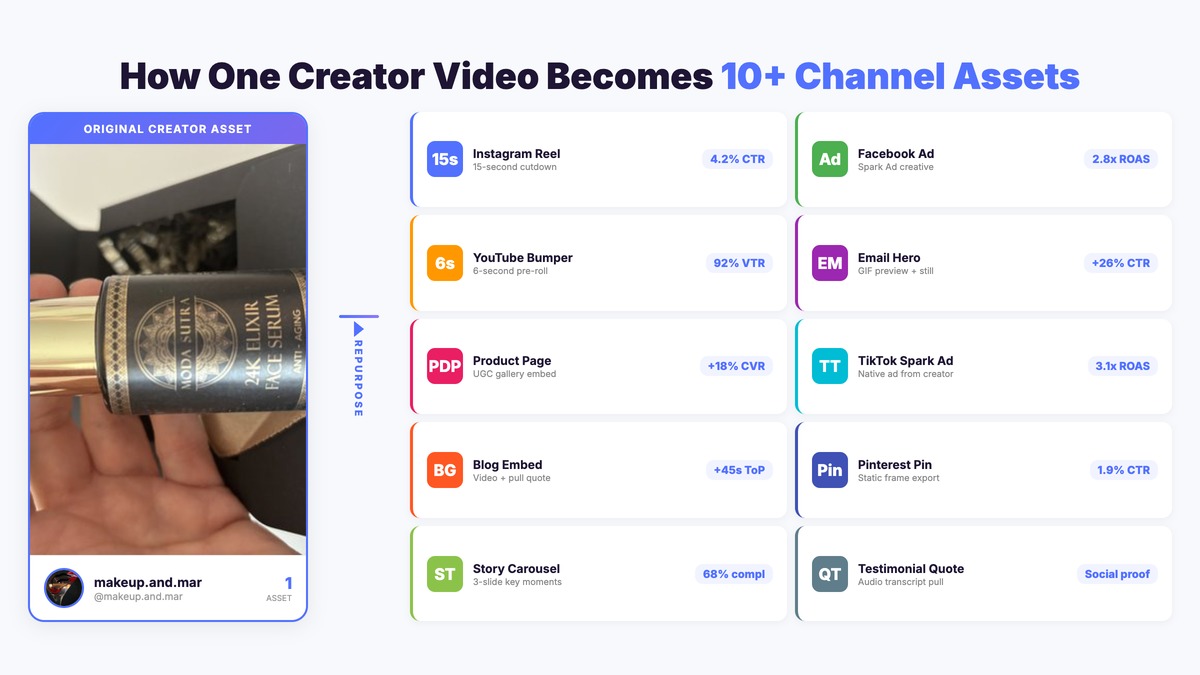
Map each original asset type to its potential derivative formats. A single 60-second TikTok-style creator video can become:
- 15-second cutdown for Instagram Reels or YouTube Shorts
- 6-second bumper ad for YouTube pre-roll
- Static thumbnail from the highest-impact frame for display ads
- GIF/animation clip for email or landing pages
- Audio testimonial for podcast ad reads or radio spots
- Transcript-based quote for blog posts, case studies, or social proof widgets
- Product page video embed showing the product in real-world use
- Spark Ad or Partnership Ad running from the creator’s own account
- Carousel frames — key moments pulled as individual images for swipeable content
- Behind-the-scenes content from B-roll for brand Stories
That’s 10 distinct assets from one creator deliverable — each serving a different channel and customer touchpoint.
Step 5: Prioritize by Performance Data
Not all creator content deserves equal repurposing effort. Use performance data from the original post to prioritize:
- High-engagement content → Repurpose aggressively across paid and organic channels
- High-save/share content → Prioritize for evergreen channels (product pages, email sequences, blog)
- High-conversion content → Fast-track to paid social with budget allocation
- Low-engagement but high-quality content → Test as paid ads (organic performance doesn’t always predict paid performance)
Which Creator Content Formats Repurpose Best
Not all creator content formats are created equal when it comes to repurposing potential. Here’s how the major formats stack up:
Video Content (Highest Repurposing Value)
Video is the most versatile creator content format because it contains multiple asset types within a single deliverable — motion, audio, still frames, and narrative. A well-produced 60-second video can yield 8-12 derivative assets across channels. The key is briefing creators to capture enough variety within the shoot to support multiple cuts and formats.
Photo Content (High Repurposing Value)
Product photography and lifestyle shots from creators repurpose naturally into paid social creatives, email headers, product page UGC galleries, and blog featured images. Photos are easier to adapt than video because they don’t require editing skills — any team member can crop, resize, or overlay text. Creator photos also tend to outperform stock photography by 35-40% in ad performance because they look authentic rather than staged.
Written Reviews and Testimonials (Medium-High Repurposing Value)
Creator testimonials — whether extracted from video transcripts, written reviews, or social captions — serve as social proof across every customer touchpoint. Pull quotes for product pages, email subject line tests, ad copy variations, case study inputs, and sales enablement materials. The limitation is that written content doesn’t carry the visual impact of video or photos, so it works best as a complement to visual assets.
Stories and Ephemeral Content (Lower Repurposing Value)
Instagram Stories and similar ephemeral formats have limited repurposing potential because they’re designed for a specific context and time frame. However, Story series can be repurposed as blog content (screenshot sequences), training materials, or inspiration for longer-form content briefs. Always ask creators to save their Stories for your review before they expire.
Structuring Creator Contracts for Repurposing Rights
The most common content repurposing failure isn’t creative — it’s legal. Brands discover too late that their creator agreement only covers organic posting on the creator’s channel, with no rights to repurpose content elsewhere. Fixing this after the fact is expensive and sometimes impossible.
Essential Rights to Negotiate Upfront
Every creator contract should explicitly address:
- Content ownership vs. licensing — Does the brand own the content outright, or is it licensed for specific uses? Ownership gives maximum flexibility; licensing is cheaper but requires tracking usage windows.
- Channel permissions — List every channel where the brand can use the content. Don’t just say “social media” — specify paid ads, email, website, retail, print, and any other touchpoints.
- Duration — How long can the brand use the content? Perpetual rights cost more upfront but eliminate renewal headaches. 12-month licenses are the most common compromise.
- Modification rights — Can the brand crop, edit, add text overlays, or combine the content with other assets? Without explicit modification rights, you can’t create derivative content.
- Whitelisting/Spark Ad permissions — Can the brand run paid ads from the creator’s account? This is separate from content usage rights and requires the creator’s ongoing cooperation.
- Exclusivity — Does the creator agree not to work with competitors for a defined period? This affects the value of repurposing — competitor content from the same creator dilutes your assets.
Pricing for Repurposing Rights
Creators typically charge 20-50% more for expanded usage rights beyond a single organic post. While this increases the per-creator cost, it dramatically reduces the per-asset cost when you factor in repurposing. A creator charging $2,000 for a single organic post versus $2,800 for full usage rights looks very different when that $2,800 produces 10 derivative assets at $280 each — compared to commissioning 10 separate assets at $500-1,000 each from other sources.
Platforms like partnrUP help brands manage usage rights tracking at scale, ensuring every repurposed asset stays within its licensed permissions and alerting teams before rights windows expire.
Channel-by-Channel Repurposing Strategy
Each marketing channel has specific requirements for how creator content should be adapted. Here’s the optimization playbook by channel:
Paid Social Ads
Creator content in paid social consistently delivers lower cost-per-acquisition than brand-produced creative. For maximum impact:
- Use the first 3 seconds of the original video as your hook — if it stopped the scroll organically, it’ll work in ads
- Test multiple cutdowns (6s, 15s, 30s) from the same source video to find optimal length per placement
- Add captions/subtitles for sound-off viewing (85% of Facebook video is watched without sound)
- Create static thumbnail variants from the highest-impact video frames for image-based placements
Email Marketing
Creator content in email boosts click-through rates by up to 26% compared to brand photography. Best practices:
- Use creator photos as hero images — they look authentic and break the pattern of polished brand photography recipients expect
- Embed creator testimonial pull quotes near product CTAs to boost social proof at the decision point
- Create GIF previews from creator videos — animated content gets 72% more engagement than static images in email
Product Pages and Ecommerce
Creator content on product pages directly impacts conversion rates and average order values. Strategies include:
- UGC gallery widgets showing real customer and creator content below the fold
- Video reviews embedded on product pages — shoppers who watch creator reviews are 85% more likely to purchase
- Creator-generated lifestyle photography replacing or supplementing professional product shots
- Social proof counters — “Featured by 47 creators” badges that aggregate your creator content volume
Blog and SEO Content
Creator assets strengthen blog content and improve SEO performance:
- Embed creator video reviews in relevant product roundup posts (increases time on page)
- Use creator quotes as expert testimonials in educational content
- Create creator spotlight posts that feature individual creators and their content
- Add creator-generated images as featured images and in-article visuals — they perform better than stock photos
Building a Scalable Asset Management System
Repurposing breaks down without a system for organizing, retrieving, and tracking creator assets. As your library grows past 100 assets, manual folder management becomes unsustainable.
What Your Asset Management System Needs
An effective creator content library requires:
- Searchable metadata — Find assets by creator, product, campaign, content type, performance tier, or usage rights status
- Rights management — Automatic tracking of licensing windows, usage permissions, and expiration alerts
- Performance data integration — Know which assets performed best on which channels to inform repurposing priorities
- Format versioning — Track the original asset and all derivative versions (crops, cutdowns, edits) in a linked hierarchy
- Team access controls — Let paid social, email, product, and content teams browse and request assets without duplicating effort
partnrUP’s creator management platform centralizes asset management alongside AI-powered creator matching, campaign tracking, and performance analytics — so your repurposing workflow lives within the same system where content is originally commissioned and delivered.
Organizing Assets for Maximum Retrieval
Structure your content library around how teams actually search for assets:
- By product/SKU — The most common search pattern. “I need creator content featuring Product X.”
- By content type — Video, photo, testimonial, B-roll. Teams know what format they need for their channel.
- By performance tier — Top performers, mid-tier, and untested. Paid teams want proven winners; organic teams can test newer content.
- By usage rights status — What can be used right now, what’s expired, what needs renewal.
- By creator demographic — Age, gender, niche, aesthetic style. Essential for targeting specific audience segments.
Measuring Repurposed Content Performance
Tracking the ROI of content repurposing requires comparing the total value generated by all versions of an asset against the original production cost. Here’s the measurement framework:
Key Metrics for Repurposed Content
- Cost per asset — Original creator fee divided by total number of derivative assets produced. Target: 60-80% reduction from single-use cost.
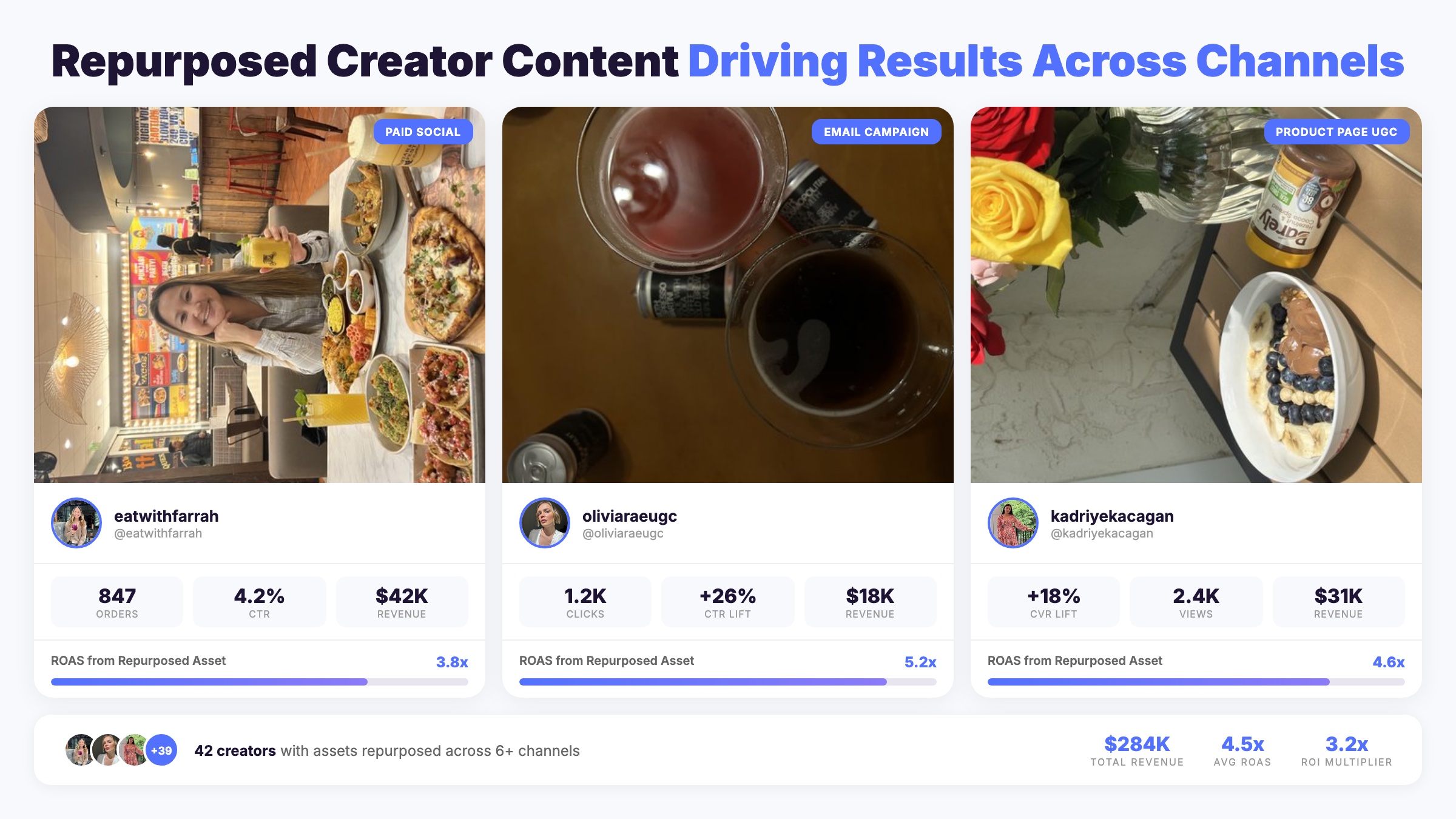
- Channel-specific performance — Track each repurposed version’s metrics independently. A creator photo might generate a 2.1% CTR as a Facebook ad but a 4.7% CTR as an email hero image — both are valid data points for future repurposing decisions.
- Incremental revenue attribution — Revenue generated by repurposed versions that wouldn’t have existed without the repurposing strategy. Use multi-touch attribution to track conversion paths that include repurposed content touchpoints.
- Content velocity — How quickly can you move from original delivery to repurposed deployment? Best-in-class teams deploy repurposed content within 48 hours of receiving creator deliverables.
- Asset utilization rate — What percentage of your creator content library is actively deployed across channels? If utilization is below 40%, your repurposing process has bottlenecks.
Building a Repurposing Dashboard
Track these metrics in a centralized dashboard that connects creator content costs to downstream performance across every channel. The dashboard should answer: “For every dollar we spent on creator content, how many dollars of value did repurposing generate?”
A strong content repurposing strategy should deliver a 3-5x multiplier on your original creator content investment. If you’re commissioning $50,000/quarter in creator content and only extracting $50,000 in channel value, there’s significant untapped potential. With systematic repurposing, that same $50,000 investment should yield $150,000-250,000 in equivalent content value across all channels.
7 Content Repurposing Mistakes That Kill Your ROI
Even brands with repurposing intent fall into patterns that limit their returns. Avoid these common pitfalls:
1. Not Securing Usage Rights Upfront
Retroactively negotiating repurposing rights costs 2-3x more than including them in the original contract. Some creators won’t grant rights after the fact at any price. Build comprehensive usage terms into every creator partnership agreement from the start.
2. Repurposing Without Adapting to Channel Context
A TikTok video dropped into a Facebook feed without any adaptation looks like lazy recycling. Each channel needs format-specific optimization — aspect ratio, length, caption style, CTA placement. Repurpose the content, not the exact execution.
3. Ignoring Performance Data When Prioritizing
Repurposing every piece of creator content equally wastes effort. Allocate repurposing resources proportionally to original performance — your top 20% of creator content should receive 80% of repurposing attention.
4. No Asset Organization System
Without a searchable, tagged content library, teams can’t find assets to repurpose. The content exists but might as well not — it’s buried in folders, Google Drives, and Slack threads where no one thinks to look.
5. Letting Assets Go Stale
Creator content has a freshness window. A product review from 18 months ago showing an outdated product version hurts more than it helps. Build content expiration dates into your asset management system and regularly audit your library for stale content that should be retired.
6. Forgetting Creator Attribution
When repurposing creator content — especially on brand-owned channels — always credit the original creator. This isn’t just ethical, it’s practical: creator attribution improves audience trust and maintains your creator relationships. Creators who see their content used without credit are unlikely to work with you again.
7. Treating Repurposing as an Afterthought
The biggest mistake is bolting repurposing onto existing workflows instead of building it in from the start. When repurposing is a core part of your content strategy, every creator brief, contract, and asset delivery process is designed to maximize multi-channel value. When it’s an afterthought, you’re constantly reverse-engineering assets that weren’t created with repurposing in mind.
Frequently Asked Questions
How many derivative assets should I create from one piece of creator content?
Aim for 8-12 derivative assets from each high-performing creator video and 4-6 from each photo set. The exact number depends on how many active channels you’re running and whether you have the internal capacity to deploy them all. Start with your highest-impact channels (paid social, email, product pages) and expand from there. Don’t create derivatives you won’t actually deploy — unused assets represent wasted editing time.
What’s the ideal contract structure for repurposing rights?
The most flexible approach is a 12-month universal usage license that covers organic, paid, email, website, and retail channels with modification rights. This typically costs 25-40% more than a single-post organic license. For brands running creator affiliate programs, perpetual usage rights can be built into the affiliate agreement at no additional cost since creators are already earning ongoing commissions.
How do I track which repurposed versions perform best?
Use UTM parameters and channel-specific tracking pixels to attribute performance to each derivative version independently. Tag every repurposed asset with a consistent naming convention (e.g., CREATOR_ORIGINAL-ID_CHANNEL_FORMAT_VERSION) so you can aggregate performance back to the original source asset. This reveals which creators produce content that repurposes well — not just which content performs well on its original channel.
Should I repurpose all creator content or just top performers?
Prioritize your top 20-30% of creator content for intensive repurposing (8-12 derivatives). Give mid-tier content light repurposing (2-3 derivatives for your highest-impact channels). Low-performing content should be analyzed for lessons but generally doesn’t warrant repurposing effort unless it shows promise for a specific channel that differs from where it originally appeared.
How quickly should I repurpose content after receiving it?
Deploy your first repurposed versions within 48 hours of receiving creator deliverables. Creator content has a freshness peak — the same audiences seeing it on the creator’s channel should encounter it in your paid and owned channels while it’s still culturally relevant. Product launches, seasonal campaigns, and trend-based content have especially short repurposing windows. Build repurposing into your standard content delivery SLA, not a separate workflow that happens weeks later.
Can I repurpose content from creator affiliate programs differently than from sponsored posts?
Yes — and you should. Affiliate creator content often has broader usage rights built into the affiliate agreement, making it easier to repurpose across channels. Affiliate content also tends to be more product-focused and conversion-oriented, which repurposes well into paid social ads and product page UGC. Sponsored post content may have more restrictive licensing terms, so always verify channel permissions before repurposing. The right tracking tools let you compare repurposed affiliate content performance against repurposed sponsored content to see which source drives better downstream results.
How does content repurposing strategy connect to working with partnrUP?
partnrUP centralizes the entire creator content lifecycle — from AI-powered creator discovery and campaign management through asset delivery, performance tracking, and rights management. Instead of managing repurposing across disconnected tools (a DAM here, a spreadsheet there, DMs for rights checks), partnrUP gives your team a single platform where every creator asset is cataloged, tagged with usage rights, and connected to performance data across all channels. The result: faster time-to-repurpose, higher asset utilization rates, and clear ROI visibility from original production through every derivative version.
Start Getting Maximum Value from Every Creator Asset
Content repurposing isn’t a nice-to-have — it’s the difference between creator marketing that’s a cost center and creator marketing that compounds into a scalable growth engine. The brands winning in 2026 aren’t outspending their competitors on creator content. They’re out-leveraging them — turning every creator deliverable into a multi-channel asset library that drives results across paid, owned, and earned channels simultaneously.
The framework is straightforward: secure rights upfront, brief for multi-format output, categorize and tag systematically, map your repurposing matrix, and prioritize by performance data. The brands that build this system now will have a compounding content advantage that’s nearly impossible for competitors to catch.
Ready to build a creator content program designed for maximum repurposing value? Book a demo with partnrUP to see how AI-powered creator matching and centralized asset management make content repurposing seamless at scale.